
If your Milwaukee power tool charger keeps blinking red, it indicates a problem preventing proper charging. This issue can stem from battery issues, charger faults, or environmental factors. Knowing how to troubleshoot safely can save you time and prevent unnecessary repairs.
In this guide, you’ll learn practical, step-by-step methods to diagnose and fix the blinking red charger on your Milwaukee tools, specifically referencing the Milwaukee M18 18V Cordless Power Tool Combo Kit. Always prioritize safety and follow proper procedures when handling batteries and chargers.
Key Takeaways
| Identify blinking pattern | Red blinking often indicates a battery or charger fault. |
| Check batteries first | Battery health is the most common cause of charging issues. |
| Ensure proper connections | Loose or dirty contacts can cause blinking red signals. |
| Test with a known good battery | Eliminate battery issues by swapping batteries. |
| Inspect the charger and environment | Look for damage or environmental factors affecting charging. |
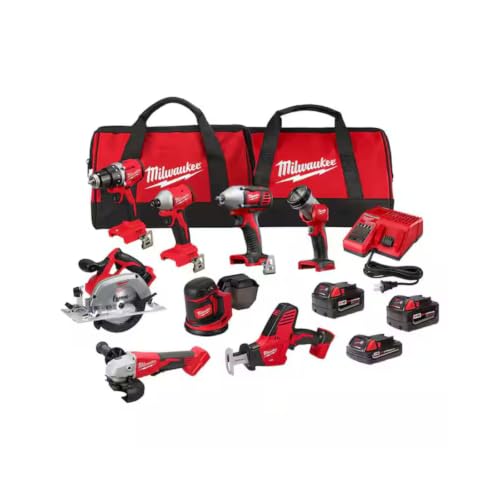
Milwaukee M18 18V Cordless Power Tool Combo Kit, 8-Tool Set, 3 Batteries, 2 Tool Bags, Charger Included
- Complete 8-Tool Set: Hammer drill, impact driver, saw, grinder, reciprocating saw, multi-tool, work light
- Includes 3 Batteries: Two high-capacity and one compact battery
- M18 Lithium-Ion System: Consistent power and extended runtime
As an affiliate, we earn on qualifying purchases.
Step 1: Understand the Red Blinking Indicator
The first step is recognizing what the red blinking light signifies. On Milwaukee chargers, a blinking red light typically indicates an error or fault condition. This could relate to a battery problem, overheating, or a charger malfunction. Refer to your specific model’s manual for exact codes, but most often, a consistent or blinking red light signals that the charger is not charging the battery properly.
Understanding this helps you diagnose whether the issue lies with the battery, the charger, or external factors like temperature or contacts.
Step 2: Inspect and Test the Battery
- Remove the battery from the charger and the tool.
- Visually examine the battery for any damage, swelling, or corrosion on the contacts.
- Clean the contacts gently with a dry cloth or a soft brush to remove dirt or debris.
- Test the battery in a different compatible charger if available, or swap it with a known good battery from your kit.
If the battery fails to charge in another charger, or if it shows signs of damage, it’s likely the culprit. Replacing the battery may be necessary.
Step 3: Check the Charger and Its Environment
Ensure the charger is plugged into a functioning power outlet. Avoid extension cords or power strips that might cause voltage drops.
Inspect the charger for visible damage, such as cracks or burnt smell. Clean the contact points on the charger and ensure they are free of dirt or debris. Make sure the charger is not overheating; allow it to cool down if it feels hot.
Testing in a different outlet or environment can help determine if external factors are influencing the blinking red light.
Step 4: Reset and Test the System
- Reinsert the battery into the charger, ensuring it is seated properly.
- Press the charging button if present, or simply connect the charger to power.
- Observe the LED indicator. If it continues blinking red, disconnect and wait for about 10 minutes before trying again.
- If the charger has a reset button or procedure, follow the manual to perform a reset.
Sometimes, a simple reset can resolve minor faults and clear error states.
Step 5: Consider Battery or Charger Replacement
If after troubleshooting the issue persists, replacing the battery or charger may be necessary. Use genuine Milwaukee parts to ensure compatibility and safety.
For batteries, consider models like the Milwaukee 48-11-1850R 5.0 Ah XC Extended Capacity Resistant Battery or the Milwaukee M18 REDLITHIUM HIGH Output XC 6.0Ah Battery Pack for extended runtime and better performance.
If your charger is faulty, contact Milwaukee customer support or visit an authorized service center for repair or replacement.
The Products in This Guide

Milwaukee M18 18V Cordless Power Tool Combo Kit
- ✔ Voltage: 18V
- ✔ Battery Capacity: Up to 5Ah
- ✔ Number of Tools: 8

Milwaukee Shockwave 100pcs Impact Driver Bit Set Packout
- ✔ Pack Size: 100 bits
- ✔ Storage: Packout case
- ✔ Impact Rated: Yes
Milwaukee M18 18V Cordless Power Tool Combo Kit
The Milwaukee M18 18V Cordless Power Tool Combo Kit is a comprehensive set perfect for various construction and maintenance tasks. Its robust power system and included accessories make it a favorite among professionals and DIYers alike.
Pros:
- Includes 8 essential tools
- 3 batteries for extended use
- Rapid charger minimizes downtime
- Durable and organized storage solutions
Cons:
- Battery lifespan can vary with heavy use
- Charger may need replacement if faulty
Best for: Construction, remodeling, and maintenance tasks requiring versatile tools
Not ideal for: Light-duty or occasional users may find the full kit unnecessary
Bottom line: A versatile, reliable power tool kit ideal for demanding jobsites.
Milwaukee Shockwave 100pcs Impact Driver Bit Set Packout
The Milwaukee Shockwave Impact Driver Bit Set Packout provides 100 impact-rated bits in a durable case, perfect for enhancing your tool’s versatility and efficiency.
Pros:
- Impact rated for durability
- Includes a variety of sizes
- Packout case for organization
- Compatible with Milwaukee impact drivers
Cons:
- Bulkier storage compared to individual bits
- Bits may wear over time with heavy use
Best for: Professional contractors and serious DIYers needing a comprehensive bit set
Not ideal for: Light hobbyist use or infrequent projects
Bottom line: A comprehensive set to keep your impact driver ready for anything.
Frequently Asked Questions
What does it mean if my Milwaukee charger blinks red?
A red blinking light generally indicates a fault – most often a problem with the battery, overheating, or a charger malfunction. Refer to your specific model’s manual for exact error codes.
Can I use any battery with my Milwaukee charger?
No, only Milwaukee M18 batteries are compatible. Ensure the battery matches the voltage and model specifications for safe and efficient charging.
How do I clean the contacts on my Milwaukee battery and charger?
Use a dry cloth or a soft brush to gently remove dirt, dust, or debris from the contacts. Avoid using liquids or abrasive cleaners to prevent damage.
What should I do if my charger still blinks red after troubleshooting?
If the issue persists, contact Milwaukee customer support or visit an authorized service center. The charger or battery may need professional inspection or replacement.
Is it safe to reset my charger?
Yes, if your charger has a reset button or procedure, performing a reset can resolve minor faults. Always follow the manufacturer’s instructions for safety.
Getting Your Milwaukee Charger Back in Action
Dealing with a blinking red light on your Milwaukee charger can be frustrating, but with systematic troubleshooting, most issues are fixable. Start by inspecting and testing your batteries, then verify the charger’s environment and connections. If necessary, replace faulty batteries or chargers to resume your work efficiently. Remember to always prioritize safety and use genuine Milwaukee parts for the best performance.
With the right approach, you’ll have your tools charging and ready for action in no time, ensuring your projects stay on track without costly repairs or downtime.
Affiliate disclosure: As an Amazon Associate we earn from qualifying purchases. Prices and availability are accurate as of the time of publishing.