
Automotive diagnostic scan tools range from basic engine-code readers to advanced tablets that scan multiple vehicle systems and run bidirectional tests. My best overall pick is the TOPDON ArtiDiag900 Lite, which balances broad diagnostic functions with an accessible touchscreen format. The Autel MaxiCOM MK900BT stands out for buyers who want a more capable professional-style platform, while the ANCEL AD310 suits drivers who mainly need to read and clear basic engine codes. The main tradeoff is between simple, affordable checks and broader system access, service functions, and active tests that may require more setup or vehicle coverage checks. Read on for the full breakdown and guidance on matching a tool to your car and repair plans.

Get business pricing on garage and car supplies
- Business-only prices and quantity discounts
- Tax-exempt purchasing
- Multiple users, one account, clear invoices
Complete the kit


Key Takeaways
- Coverage matters more than a long feature list: The ranking gives priority to tools that access the systems and functions a buyer is likely to use, rather than treating every advertised reset as equally useful.
- Bidirectional control separates diagnosis from basic code reading: Picks such as the TOPDON ArtiDiag900 Lite, MUCAR 632, and Autel MaxiCOM MK900BT add active tests that can help narrow down faults, but they are more than many occasional users need.
- Vehicle fit is a deciding factor: System access, resets, and active tests can vary by make, model, year, and region, so buyers should check compatibility before choosing a feature-heavy scanner.
- Simple readers still have a clear role: The ANCEL AD310 and AD410 focus on engine-code tasks, while the FOXWELL NT301 adds live-data viewing for owners who want more information without moving to a full-system tablet.
- The lineup spans distinct ownership needs: Bluetooth options such as BlueDriver emphasize phone-based use, compact wired readers favor quick checks, and larger Autel and TOPDON tablets suit deeper diagnostic work.
| TOPDON ArtiDiag900 Lite Bidirectional OBD2 Scanner with 8-Inch Touchscreen |  | Best for a Large Screen and Wireless Active Tests | Display: 8-inch touchscreen | Operating system: Android 11.0 | Battery capacity: 10,000 mAh | VIEW LATEST PRICE | See Our Full Breakdown |
| MUCAR 632 Bidirectional OBD2 Diagnostic Scanner with AI-Assisted Analysis | 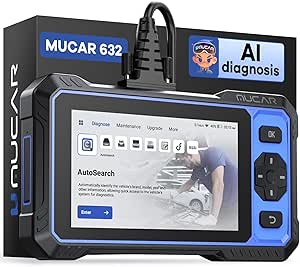 | Best for Broad Service Coverage and Guided Code Analysis | Display: 6.2-inch touchscreen, 1024 × 600 | Processor: 1.8 GHz | Operating system: Android 8.1 | VIEW LATEST PRICE | See Our Full Breakdown |
| BLCKTEC 460T OBD2 Scanner with All-System Diagnostics and 12+ Reset Functions |  | Best for Live-Data Review | Model: 460T | Diagnostic systems: Engine, transmission, ABS, SRS, and other vehicle ECUs | Service functions: 12+; includes oil, ABS bleeding, EPB, SAS, DPF, throttle, battery, TPMS, and transmission | VIEW LATEST PRICE | See Our Full Breakdown |
| FOXWELL NT604 Elite OBD2 Automotive Diagnostic Scanner |  | Best for Straightforward Multi-System Scans | Diagnostic systems: Engine, ABS, SRS, and transmission | Vehicle coverage: 60+ car brands; compatibility varies by make, model, and year | Features: AUTOVIN, live data, DTC library, data playback and printing, and I/M readiness | VIEW LATEST PRICE | See Our Full Breakdown |
| ANCEL AD310 OBD II Car Code Reader | 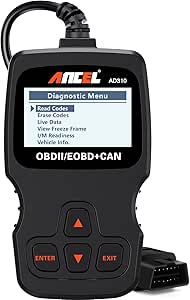 | Best Basic Emissions-Code Reader | Diagnostic scope: Emission-related issues | Supported protocols: KWP2000, J1850 VPW, ISO9141, J1850 PWM, and CAN | Vehicle compatibility: OBD II vehicles, including many US vehicles from 1996 and newer and EU/Asian vehicles from 2000 and newer | VIEW LATEST PRICE | See Our Full Breakdown |
| ANCEL AD410 Enhanced OBD2 Scanner and Vehicle Code Reader |  | Best for Basic Engine Checks | Brand and model: ANCEL AD410 | Display: 2.4-inch color display | Weight: 10.56 ounces | VIEW LATEST PRICE | See Our Full Breakdown |
| FOXWELL NT301 OBD2 Diagnostic Scanner with Live Data |  | Best for Live-Data Monitoring | Brand and model: FOXWELL NT301 | Screen: 2.8-inch color screen | Weight: 0.16 kg | VIEW LATEST PRICE | See Our Full Breakdown |
| Autel MaxiCOM MK900BT Bidirectional Diagnostic Scanner |  | Best Premium Shop-Level Coverage | Display: 8 inches | Active tests: More than 3,000 | Service functions: More than 40 | VIEW LATEST PRICE | See Our Full Breakdown |
| Autel MaxiCheck MX808S Bidirectional OBD2 Diagnostic Scanner |  | Best for Active Testing and Service Work | Processor: Rockchip RK3566 quad-core | Operating system: Android 11 | Memory and storage: 4 GB RAM; 64 GB storage | VIEW LATEST PRICE | See Our Full Breakdown |
| Autel MaxiCOM MK808S Automotive Diagnostic Scanner |  | Best Wired Shop Tablet | Connection: Wired | Display: 7 inches | Processor and memory: RK3566 processor; 4 GB memory | VIEW LATEST PRICE | See Our Full Breakdown |
| BlueDriver Bluetooth OBD2 Scanner |  | Best for Phone-Based Diagnostics | Brand: BlueDriver | Model: Pro | Connection: Bluetooth | VIEW LATEST PRICE | See Our Full Breakdown |
| TOPDON ONE Bidirectional Automotive Diagnostic Scan Tool with 10.1-Inch Touchscreen |  | Best for Advanced Shop-Level Work | Screen size: 10.1 inches | Item weight: 3.5 pounds | Connectivity: Dual Wi-Fi | VIEW LATEST PRICE | See Our Full Breakdown |
| Innova 5610 OBD2 Bidirectional Scan Tool |  | Best for Hands-On Component Testing | Brand: Innova | Model: 5610 | Item weight: 1.3 pounds | VIEW LATEST PRICE | See Our Full Breakdown |
| XTOOL D5S OBD2 Scanner with 16 Reset Functions |  | Best Value for Maintenance Resets | Model: D5S | Diagnostic systems: Engine, transmission, ABS, and SRS | Reset functions: 16 | VIEW LATEST PRICE | See Our Full Breakdown |
| TOPDON AD600S OBD2 Scanner with Engine, ABS, SRS, and Transmission Diagnostics |  | Best Standalone Midrange Pick | Display: 5-inch touchscreen | Item weight: 630 g | Operating system: Android 11 | VIEW LATEST PRICE | See Our Full Breakdown |
| automotive diagnostic scan tool | Vehicle coverage |
|---|---|
| TOPDON ArtiDiag900 Lite Bidire | Cars from 1996 to 2025; feature availability varies by make and model |
| MUCAR 632 Bidirectional OBD2 D | — |
| BLCKTEC 460T OBD2 Scanner with | — |
| FOXWELL NT604 Elite OBD2 Autom | 60+ car brands; compatibility varies by make, model, and year |
| ANCEL AD310 OBD II Car Code Re | — |
| ANCEL AD410 Enhanced OBD2 Scan | — |
| FOXWELL NT301 OBD2 Diagnostic | — |
| Autel MaxiCOM MK900BT Bidirect | 150+ brands; vehicles from 1996–2026 |
| Autel MaxiCheck MX808S Bidirec | Over 150 brands; compatibility and functions vary by vehicle |
| Autel MaxiCOM MK808S Automotiv | 200+ brands |
| BlueDriver Bluetooth OBD2 Scan | — |
| TOPDON ONE Bidirectional Autom | — |
| Innova 5610 OBD2 Bidirectional | Most 1996–2023 OBD2 vehicles, with compatibility limited to select makes and models |
| XTOOL D5S OBD2 Scanner with 16 | OBDII vehicles built after 1996; cars and 12V trucks across 90+ brands |
| TOPDON AD600S OBD2 Scanner wit | 90+ brands; many OBDII-compliant 12V vehicles from 1996 onward |
More Details on Our Top Picks
TOPDON ArtiDiag900 Lite Bidirectional OBD2 Scanner with 8-Inch Touchscreen
The TOPDON ArtiDiag900 Lite pairs full-system diagnostics with bidirectional tests, letting owners do more than read codes: supported active tests can help narrow down whether a component responds to a command. Its 8-inch touchscreen gives live data and diagnostic menus more room than the MUCAR 632’s 6.2-inch display, while Bluetooth lets you move around the vehicle without staying tethered to the OBD port. Eight reset services add useful maintenance coverage, though supported functions vary by vehicle.
That larger format comes with a tradeoff: at 4.8 lb, it is less convenient to carry than a basic reader such as the ANCEL AD310. The repair guide is limited to select Chrysler, Dodge, Jeep, and Fiat models, and battery testing needs an optional accessory. I’d choose it for hands-on diagnostics, not as a compact code reader.
Pros:- Bidirectional active tests can help check supported components beyond reading fault codes.
- Full-system diagnostics include live data and code reading and clearing.
- Eight reset services cover common tasks such as oil, EPB, DPF, and BMS service.
- Bluetooth 5.0 and an 8-inch touchscreen support untethered, easy-to-read use.
Cons:- The 4.8 lb scanner is bulky compared with simple handheld readers.
- DTC repair guidance is limited to select Chrysler, Dodge, Jeep, and Fiat model years.
- Battery testing requires an optional accessory.
Best for: DIY owners who want wireless, full-system scans, active tests, and a large display for working around a garage.
Not ideal for: Drivers seeking a pocketable emissions-code reader or a scanner with battery testing included; this is larger and battery testing requires an optional accessory.
- Display:8-inch touchscreen
- Operating system:Android 11.0
- Battery capacity:10,000 mAh
- Wireless connectivity:Bluetooth 5.0; range up to 33 ft (10 m)
- Diagnostics:Full-system diagnostics, live data, and bidirectional active tests
- Reset services:Oil, throttle, EPB, steering angle, DPF, ABS bleeding, BMS, and airbag
- Vehicle coverage:Cars from 1996 to 2025; feature availability varies by make and model
- Weight:4.8 lb
- Warranty:2 years
Our verdict“Choose the ArtiDiag900 Lite if you value a large wireless screen and active tests more than a lightweight, basic code reader.”
MUCAR 632 Bidirectional OBD2 Diagnostic Scanner with AI-Assisted Analysis
The MUCAR 632 suits owners who want a broad service tool without moving to a larger tablet-style scanner. It reads engine, ABS, SRS, and transmission codes, displays live data, and supports bidirectional tests; its 15+ service functions exceed the eight listed for the TOPDON ArtiDiag900 Lite. AI-assisted fault-code analysis may help turn a code into a clearer starting point for research, while AutoVIN and CAN FD add useful identification and protocol support on compatible vehicles.
The tradeoff is that guidance depends on an internet connection and current software, and vehicle coverage still varies. FCA AutoAuth also requires a separate account. Its 6.2-inch screen is more manageable than TOPDON’s 8-inch display, but buyers who want especially simple, emissions-only checks may find the ANCEL AD310 easier to operate. I’d pick this for owners who will use its wider diagnostic and service range.
Pros:- Reads engine, ABS, SRS, and transmission codes and provides live data.
- Bidirectional controls support active tests for compatible vehicle functions.
- More than 15 reset and service functions provide broad maintenance coverage.
- Lifetime free software updates and CAN FD support are included.
Cons:- AI-assisted analysis needs an internet connection and current software.
- FCA AutoAuth requires separate account registration.
- Vehicle and function compatibility varies by make, model, and year.
Best for: DIY mechanics who want bidirectional tests, multiple-system diagnostics, and a wide selection of maintenance functions in one touchscreen tool.
Not ideal for: Drivers who only need basic engine-emissions code checks, or users who need FCA access without setting up a separate AutoAuth account.
- Display:6.2-inch touchscreen, 1024 × 600
- Processor:1.8 GHz
- Operating system:Android 8.1
- Storage:32 GB; expandable by TF card up to 128 GB
- Diagnostics:Engine, ABS, SRS, and transmission
- Service functions:15+ reset and maintenance functions
- Connectivity and protocols:Wi-Fi, CAN FD, and FCA AutoAuth support
- Vehicle identification:AutoVIN
- Updates:Lifetime free software updates
Our verdict“Pick the MUCAR 632 if you want a broad set of diagnostic and service functions and can confirm support for your vehicle.”
BLCKTEC 460T OBD2 Scanner with All-System Diagnostics and 12+ Reset Functions
The BLCKTEC 460T stands out for examining how a vehicle behaves, not just collecting fault codes. It records and replays live data, graphs and overlays up to four streams, and provides freeze-frame information, which can help owners compare sensor readings around a fault. It also scans engine, transmission, ABS, SRS, and other ECUs, with 12+ service functions covering tasks such as oil, EPB, DPF, TPMS, and ABS bleeding.
Compared with the FOXWELL NT604 Elite, the 460T adds maintenance functions and richer live-data tools; the FOXWELL is more focused on core system scans and code handling. BLCKTEC includes lifetime updates and the RepairSolutions2 app, but scanner and app support is limited to the USA and Canada, and individual functions depend on the vehicle. I’d shortlist it for data-focused DIY troubleshooting, not for use outside its supported regions.
Pros:- Reads and clears codes across engine, transmission, ABS, SRS, and other supported ECUs.
- Graphs, records, replays, and overlays up to four live-data streams.
- Includes freeze-frame data and 12+ service functions.
- Free lifetime updates and RepairSolutions2 app access are included.
Cons:- Scanner and companion-app support is limited to the USA and Canada.
- Service-function availability varies by vehicle year, make, and model.
Best for: DIY troubleshooters in the USA or Canada who want to graph, record, and replay multi-system live data as well as perform supported resets.
Not ideal for: Owners outside the USA and Canada, or buyers who need a specific reset or diagnostic function without first checking vehicle compatibility.
- Model:460T
- Diagnostic systems:Engine, transmission, ABS, SRS, and other vehicle ECUs
- Service functions:12+; includes oil, ABS bleeding, EPB, SAS, DPF, throttle, battery, TPMS, and transmission
- Live data:OBD2 and OEM data; graph, record, replay, and overlay up to four streams
- Additional features:AutoVIN, AutoScan, AutoReLink, freeze-frame data, and I/M readiness
- Vehicle compatibility:OBD2-compliant vehicles sold and registered in the USA and Canada from 1996 onward; feature availability varies
- Updates:Free lifetime updates
- Companion app:RepairSolutions2
Our verdict“Choose the BLCKTEC 460T if detailed live-data review and service functions matter more than regional flexibility.”
FOXWELL NT604 Elite OBD2 Automotive Diagnostic Scanner
The FOXWELL NT604 Elite is a practical step up from an engine-only code reader for owners who want access to four common systems: engine, ABS, SRS, and transmission. AUTOVIN, an onboard DTC library, and live data make it useful for identifying and reviewing supported faults, while data playback and printing give buyers a way to keep or share diagnostic information. It also comes with its software, a protective case, and lifetime updates.
Its limits are clear beside the BLCKTEC 460T and MUCAR 632: it does not perform maintenance resets or relearns, including oil reset and ABS bleeding. It also cannot clear SRS crash or collision data. That makes the NT604 Elite a better fit for code checks than repair work that requires service commands. I’d choose it over the simpler ANCEL AD310 when multi-system coverage matters, but skip it if resets are part of the job.
Pros:- Scans engine, ABS, SRS, and transmission systems.
- AUTOVIN and an onboard DTC library support vehicle identification and code lookup.
- Live data, playback, and printing help review or share diagnostic information.
- Includes a protective case and lifetime updates without an extra software fee.
Cons:- Does not support oil reset, battery registration, ABS bleeding, throttle body relearn, or ABS relearn.
- Cannot clear SRS crash or collision data.
- Vehicle compatibility varies by make, model, and year.
Best for: Owners who want an out-of-the-box handheld tool for checking supported engine, ABS, SRS, and transmission faults without needing service resets.
Not ideal for: DIY mechanics who need oil resets, battery registration, ABS bleeding, relearns, or SRS crash-data clearing.
- Diagnostic systems:Engine, ABS, SRS, and transmission
- Vehicle coverage:60+ car brands; compatibility varies by make, model, and year
- Features:AUTOVIN, live data, DTC library, data playback and printing, and I/M readiness
- Updates:Lifetime updates; no extra software fee
- Included components:Diagnostic cable, USB cable, quick start guide, user manual, and protective case
- Maintenance functions:Does not support oil reset, battery registration, ABS bleeding, throttle body relearn, or ABS relearn
Our verdict“Choose the NT604 Elite for straightforward multi-system fault checks, but not for maintenance resets or relearn procedures.”
ANCEL AD310 OBD II Car Code Reader
The ANCEL AD310 keeps its job narrow: reading and clearing emission-related trouble codes, displaying live and freeze-frame data, and checking I/M readiness. That is a sensible fit for drivers who want to see why a check-engine light is on or check emissions readiness without dealing with a companion app or a more involved scanner. It draws power through the vehicle connector, so there is no battery or charger to manage, and its labeled buttons keep basic checks simple.
Its narrow diagnostic scope is also its main limitation. Unlike the FOXWELL NT604 Elite, it does not scan ABS, SRS, or transmission systems, and it has none of the service functions offered by the MUCAR 632. I’d choose the AD310 for occasional engine-emissions checks, not for diagnosing a wider vehicle fault. Buyers should confirm OBD II compatibility, especially for older or non-US vehicles.
Pros:- Reads and clears emission-related trouble codes.
- Displays live data, freeze-frame information, I/M readiness, and vehicle information.
- Powered by the vehicle’s OBD II connector, so no batteries or charger are needed.
- Compact, lightweight design includes labeled buttons and a 2.5-foot cable.
Cons:- Limited to emission-related diagnostics; it does not cover ABS, SRS, or transmission systems.
- Does not work with vehicles that have only an OBD I interface.
- Compatibility depends on the vehicle and its supported OBD II protocols.
Best for: Drivers who want a simple, self-powered reader for engine-emissions codes, live data, freeze-frame details, and I/M readiness.
Not ideal for: Owners diagnosing ABS, SRS, transmission, or other non-emissions systems, and drivers with vehicles that have only an OBD I interface.
- Diagnostic scope:Emission-related issues
- Supported protocols:KWP2000, J1850 VPW, ISO9141, J1850 PWM, and CAN
- Vehicle compatibility:OBD II vehicles, including many US vehicles from 1996 and newer and EU/Asian vehicles from 2000 and newer
- Cable length:2.5 ft
- Weight:12 oz
- Dimensions:8.9 × 6.9 × 1.4 in
- Power:Powered through the vehicle’s OBD II connector
- Displayed information:Live data, freeze-frame information, I/M readiness, and vehicle information
Our verdict“Pick the AD310 for simple check-engine and emissions-readiness checks, but choose a multi-system scanner for broader diagnosis.”
ANCEL AD410 Enhanced OBD2 Scanner and Vehicle Code Reader
The ANCEL AD410 is a straightforward choice for drivers who want to identify common engine and emissions faults without relying on a phone or app. It reads and clears codes, displays definitions and live data, and adds checks such as freeze-frame, I/M readiness, O2 sensor, and EVAP tests. That gives it more diagnostic context than a basic code reader like the ANCEL AD310, while keeping operation simple: plug it into the OBD2 port and use its 2.4-inch color display.
The tradeoff is narrow system coverage. Unlike the FOXWELL NT301, which graphs live sensor data, the AD410’s listed features do not include graphing. It also cannot diagnose ABS, SRS, or transmission faults, run active tests, or perform service resets. I’d choose it for engine-light troubleshooting, not as a workshop-wide scanner.
Pros:- Reads and clears engine and emissions codes with on-screen code definitions
- Includes live data, freeze-frame, I/M readiness, O2 sensor, and EVAP checks
- Runs from the vehicle’s OBD2 port without an app or separate battery
- Supports several common OBD2 protocols
Cons:- Does not diagnose ABS, SRS, or transmission systems
- No bidirectional control or service reset functions
- Live data graphing is not listed, unlike the FOXWELL NT301
Best for: Drivers who want a self-contained tool for checking engine and emissions codes, readiness status, and basic live data on a compatible OBD2 vehicle.
Not ideal for: DIYers diagnosing ABS, airbag, or transmission faults, or anyone who needs bidirectional tests, service resets, or graphing.
- Brand and model:ANCEL AD410
- Display:2.4-inch color display
- Weight:10.56 ounces
- Power:Powered through the vehicle’s OBD2 port
- Vehicle compatibility:Most 1996-and-newer U.S. OBD2 vehicles; many 2000-and-newer EU and Asian OBD2 vehicles
- Supported protocols:CAN, ISO9141, KWP2000, J1850 VPW, J1850 PWM
- Supported diagnostics:Engine and emissions codes, live data, freeze frame, I/M readiness, O2 sensor test, EVAP test, vehicle information, MIL status
- Unsupported functions:ABS, SRS, transmission, bidirectional control, service resets
Our verdict“Choose the AD410 for simple, app-free engine and emissions checks, but step up to a broader scanner if you need system-level diagnostics.”
FOXWELL NT301 OBD2 Diagnostic Scanner with Live Data
The FOXWELL NT301 earns its place for drivers who want more than a stored code: it can display and graph live sensor data, making changing readings easier to follow while troubleshooting. It also reads and clears engine codes and checks I/M readiness and EVAP status. Its 2.8-inch color screen is larger than the ANCEL AD410’s 2.4-inch display, and its plug-in design avoids the setup and phone connection that some app-based scanners require.
Its scope remains focused on engine-related OBD2 diagnostics. The NT301 does not offer dedicated ABS, SRS, or TPMS coverage, nor service resets, key programming, or battery health testing. Compared with the AD410, its graphing is a useful distinction; compared with the Autel MaxiCheck MX808S, it is much more limited in system coverage and active testing. Vehicle-specific functions also vary, so buyers should check compatibility before relying on a particular test.
Pros:- Graphs live sensor data to make changing readings easier to interpret
- Reads and clears engine fault codes
- Includes I/M readiness and EVAP checks
- Plug-and-play operation with a color screen
Cons:- Does not provide dedicated ABS, SRS, or TPMS diagnostics
- No service resets, key programming, or battery health testing
- Available functions vary by vehicle and its OBD2 support
Best for: DIY owners who want to watch and graph engine sensor readings while investigating a check-engine light or emissions readiness.
Not ideal for: Owners who need ABS, SRS, or TPMS diagnostics, maintenance resets, key programming, or a scanner for multiple vehicle systems.
- Brand and model:FOXWELL NT301
- Screen:2.8-inch color screen
- Weight:0.16 kg
- Power:Powered through the vehicle’s diagnostic port
- Compatibility:Most 1996-and-newer U.S. gasoline cars, light trucks, and SUVs; many 2000-and-newer European and Asian models; compatible 12V diesel vehicles with OBD2
- Supported protocols:KWP2000, J1850 VPW, ISO9141, J1850 PWM, CAN
- Diagnostics:Engine code reading and clearing, graphing live data, I/M readiness, EVAP testing
- Warranty:12 months
Our verdict“Pick the NT301 over the AD410 if graphing live engine data matters most, but choose a full-system scanner for diagnostics beyond the engine.”
Autel MaxiCOM MK900BT Bidirectional Diagnostic Scanner
The Autel MaxiCOM MK900BT is the broadest, most workshop-oriented option in this group. Its all-system diagnostics, more than 3,000 active tests, and over 40 service functions give technicians more ways to investigate faults and command compatible vehicle components than the narrower AD410 or NT301. Support for CAN FD and DoIP also extends its protocol coverage, while automatic vehicle identification and pre- and post-scan reports can help organize repeatable shop workflows.
That breadth comes with dependencies: functions vary by vehicle, some features need separately purchased accessories, and battery testing requires the BT506. The included software updates last one year, a limitation buyers should factor into longer-term ownership. Its 8-inch display and Bluetooth/Wi-Fi connectivity suit a diagnostic workstation better than a glovebox code reader. The MaxiCheck MX808S also offers bidirectional testing, but the MK900BT lists more service functions and adds Wi-Fi report printing.
Pros:- All-system diagnostics with more than 3,000 active tests
- More than 40 service functions
- Supports CAN FD and DoIP protocols
- Creates pre- and post-scan reports with Wi-Fi printing
Cons:- Compatibility and available functions vary by vehicle
- Battery testing requires the separately purchased BT506
- Included software updates are limited to one year
Best for: Independent technicians and experienced DIYers who need broad system coverage, active tests, and scan reports across a varied vehicle fleet.
Not ideal for: Drivers seeking an inexpensive, engine-only code reader or buyers who want battery testing and every advanced function without extra accessories.
- Display:8 inches
- Active tests:More than 3,000
- Service functions:More than 40
- Vehicle coverage:150+ brands; vehicles from 1996–2026
- Protocols:CAN FD and DoIP
- Connectivity:Bluetooth and Wi-Fi
- Diagnostic functions:All-system diagnostics, code reading and clearing, live data, recording and playback
- Updates and battery testing:One year of software updates included; battery testing supported with separately purchased BT506
Our verdict“Choose the MK900BT for broad shop-oriented diagnostics and reporting; it is excessive for routine engine-code checks like those handled by the AD410.”
Autel MaxiCheck MX808S Bidirectional OBD2 Diagnostic Scanner
The Autel MaxiCheck MX808S makes more sense than the NT301 for owners who need to look beyond engine codes. It provides full-system diagnostics for compatible vehicles, including engine, transmission, ABS, SRS, and TPMS, alongside more than 3,000 active tests and over 28 maintenance services. Those active tests let a user command supported components during diagnosis rather than relying only on stored codes. Live data can appear as graphs, text, columns, meters, or waveforms, giving technicians different ways to examine a fault.
Its Android 11 hardware, 4 GB RAM, and 64 GB storage position it as a capable tablet-style tool, while the MK900BT offers a larger 8-inch display and more than 40 service functions. Coverage is not universal: vehicle support and service availability vary, and compatibility deserves extra checking for pre-2000 vehicles. This is a substantial step up from the AD410, but more scanner than a basic check-engine-light reader requires.
Pros:- Full-system diagnostics covering engine, transmission, ABS, SRS, and TPMS on compatible vehicles
- More than 3,000 active tests and over 28 maintenance services
- Displays live data in graph, text, column, meter, and waveform formats
- Android 11 platform with 4 GB RAM and 64 GB storage
Cons:- Vehicle coverage and available service functions vary
- Compatibility should be checked carefully, especially for vehicles made before 2000
Best for: Experienced DIYers and repair professionals who need bidirectional tests, multiple-system scans, and maintenance services on supported vehicles.
Not ideal for: Drivers who only want to read engine codes, or owners whose vehicles lack confirmed support for the specific systems and service functions they need.
- Processor:Rockchip RK3566 quad-core
- Operating system:Android 11
- Memory and storage:4 GB RAM; 64 GB storage
- Active tests:Over 3,000
- Service functions:More than 28
- Diagnostics:Full-system diagnostics, including engine, transmission, ABS, SRS, and TPMS
- Live data formats:Graph, text, column, meter, and waveform
- Vehicle coverage:Over 150 brands; compatibility and functions vary by vehicle
- FCA support:Aut0.Auth for compatible 2018-and-newer Chrysler, Jeep, Dodge, and Fiat vehicles
Our verdict“Choose the MX808S when active testing and multi-system service work matter more than the simpler engine-only coverage of the AD410.”
Autel MaxiCOM MK808S Automotive Diagnostic Scanner
The Autel MaxiCOM MK808S pairs full-system scanning with a wired connection, which suits a fixed garage setup where a direct link matters more than wireless freedom. It offers more than 3,000 active tests, over 28 service functions, and 5-in-1 live data, putting it well beyond the engine-and-emissions focus of the AD410. Its 7-inch screen gives diagnostic information more room than a handheld code reader, and the 21-language menu can help in a shared or multilingual workshop.
The product data lists coverage across 200+ brands, but actual diagnostics and service functions still depend on the vehicle. The MX808S is a close relative in capability, with Android 11 and 4 GB RAM/64 GB storage specified; this model’s supplied details emphasize the wired setup, display, language options, and 5-in-1 data. The tradeoff is that it is not a compact, casual-use reader, and ongoing software upgrades may involve a fee.
Pros:- Full-system diagnostics across major vehicle systems
- More than 3,000 active tests and over 28 service functions
- 5-in-1 live data and a 7-inch display
- Supports 21 menu languages and lists coverage for 200+ brands
Cons:- Vehicle compatibility and available functions vary by model
- Wired connection limits freedom to move around the vehicle
- Software upgrades may involve an annual fee
Best for: Independent garages and advanced DIYers who prefer a wired tablet scanner for full-system work across multiple vehicle makes.
Not ideal for: Drivers who want a compact engine-code reader, wireless freedom, or a tool with confirmed identical coverage across every listed vehicle brand.
- Connection:Wired
- Display:7 inches
- Processor and memory:RK3566 processor; 4 GB memory
- Operating system:Android 11
- Active tests:3,000+
- Vehicle coverage:200+ brands
- Service functions:28+
- Live data and languages:5-in-1 live data; 21 languages
Our verdict“Pick the MK808S for a wired, multilingual shop tablet with broad diagnostic functions, not for quick engine-code checks or wireless use.”
BlueDriver Bluetooth OBD2 Scanner
For drivers who want more than basic engine-code reading without carrying a dedicated tablet, the BlueDriver pairs wirelessly with an iOS or Android device. It can read and clear codes across the engine and supported systems such as ABS, SRS, TPMS, and transmission, while live data and smog-readiness checks help with everyday troubleshooting and inspection prep. Technician-verified repair reports offer a more practical next step than a code alone. Compared with the Innova 5610, BlueDriver is more phone-dependent and does not offer bidirectional component testing, but its no-subscription app model keeps ongoing access straightforward. Coverage for non-engine systems varies by vehicle, so buyers should check support before relying on a particular function. Skip it if you want a standalone screen or active tests.
Pros:- Reads and clears engine and supported ABS, SRS, TPMS, and transmission codes
- Provides live data, smog-readiness checks, and technician-verified repair reports
- Bluetooth connection lets a phone or tablet serve as the display
- No subscription fees or account required
Cons:- Requires a compatible phone or tablet
- Some system diagnostics depend on the vehicle’s supported coverage
- Does not provide the bidirectional controls available on tools such as the Innova 5610
Best for: Drivers with a compatible iOS or Android device who want multi-system code reading, live data, and repair guidance without a subscription.
Not ideal for: DIYers who need a standalone scanner or bidirectional control for testing vehicle components.
- Brand:BlueDriver
- Model:Pro
- Connection:Bluetooth
- Supported devices:iOS and Android
- Vehicle compatibility:Gas-powered vehicles made in 1996 or newer, plus select light-duty trucks and diesels
- Subscription:None
- Warranty:180-day money-back guarantee; one-year defect coverage
Our verdict“Choose BlueDriver if you want phone-based multi-system diagnostics and repair reports without paying for ongoing app access.”
TOPDON ONE Bidirectional Automotive Diagnostic Scan Tool with 10.1-Inch Touchscreen
The TOPDON ONE is the most ambitious option in this group for buyers who need a dedicated diagnostic platform rather than a phone-linked code reader. Its bidirectional controls, ECU topology mapping, and more than 50 service functions can support deeper fault-finding and maintenance work; CAN-FD, DoIP, and J2534 pass-through add relevance for newer vehicles and compatible OEM software. The 10.1-inch touchscreen gives more room to review system data than the compact TOPDON AD600S, while guided functions and TopFix AI may help turn fault information into a repair direction. The tradeoff is cost of ownership in time and access: some software features, updates, and hardware warranty coverage depend on an active subscription, and vehicle-specific functions vary. It is excessive for occasional check-engine-light scans.
Pros:- Bidirectional diagnostics and more than 50 service functions
- ECU topology mapping helps show relationships among vehicle systems
- Supports CAN-FD, DoIP, and J2534 pass-through with compatible OEM software
- Large 10.1-inch touchscreen and TopFix AI fault-code guidance
Cons:- Some software features and updates require an active subscription
- Hardware warranty coverage has subscription-related conditions
- Available functions vary by vehicle
Best for: Independent technicians and advanced DIYers who need a large-screen tablet, bidirectional testing, broad service functions, and newer protocol support.
Not ideal for: Drivers who only need occasional code checks or want ongoing software access and warranty coverage without subscription conditions.
- Screen size:10.1 inches
- Item weight:3.5 pounds
- Connectivity:Dual Wi-Fi
- Supported protocols:CAN-FD, DoIP, and J2534
- Service functions:More than 50
- Diagnostic features:Bidirectional diagnostics and ECU topology mapping
- Included components:ONE tablet, ONE VCI, OBDII extension cable, USB-C to USB-C cable, USB-A to USB-C cable, power adapter, and quick user guide
Our verdict“Pick the TOPDON ONE for advanced diagnostic work that benefits from topology mapping and protocol breadth, provided you accept subscription-dependent features.”
Innova 5610 OBD2 Bidirectional Scan Tool
The Innova 5610 earns its place for DIYers who want to move from reading faults to checking how vehicle components respond. Its bidirectional controls can activate items such as a fuel pump or parking brake, while live data covers engine, ABS, SRS, and transmission systems. That makes it a more active diagnostic tool than the phone-based BlueDriver, which supplies useful data and repair reports but does not offer the same component controls. The 5610 also has English, Spanish, and French interfaces, free software updates, and ASE-certified support through RepairSolutions2. Its key limitation is fit: compatibility is restricted to supported makes and models, despite its stated coverage of many 1996–2023 OBD2 vehicles. Buyers should confirm their exact vehicle before purchase, especially if they expect access to every advanced function.
Pros:- Bidirectional controls can activate components such as the fuel pump and parking brake
- Live data covers engine, ABS, SRS, and transmission systems
- English, Spanish, and French interface options
- Free software updates and ASE-certified support through RepairSolutions2
Cons:- Compatibility is limited to select makes and models
- Advanced functions may not be available on every supported vehicle
Best for: Hands-on DIYers who want to run active tests on supported vehicles and inspect live data across engine, ABS, SRS, and transmission systems.
Not ideal for: Owners of vehicles outside the supported make-and-model list or buyers who want guaranteed full-system coverage across every OBD2 vehicle.
- Brand:Innova
- Model:5610
- Item weight:1.3 pounds
- Vehicle coverage:Most 1996–2023 OBD2 vehicles, with compatibility limited to select makes and models
- Diagnostic systems:Engine, ABS, SRS, and transmission
- Interface languages:English, Spanish, and French
- Updates and support:Free software updates and ASE-certified support via the RepairSolutions2 app
Our verdict“Choose the Innova 5610 if active component testing matters more to you than BlueDriver’s phone-first setup and repair-report emphasis.”
XTOOL D5S OBD2 Scanner with 16 Reset Functions
The XTOOL D5S focuses on a useful middle ground: broader diagnostics than a basic engine reader, plus 16 maintenance reset functions for owners who handle routine service themselves. It reads and clears codes across engine, transmission, ABS, and SRS systems, and its live-data text and graph views can help show whether a fault changes with operating conditions. Compared with the TOPDON AD600S, the D5S lists more reset functions and avoids subscription fees, making ongoing software access simpler. The AD600S, by contrast, specifies CAN-FD, AutoVIN, and report sharing, so the better fit depends on which workflow matters more. D5S coverage still varies by vehicle, and it does not support Indian domestic vehicle brands; check compatibility before buying rather than assuming every reset works on every car.
Pros:- Offers 16 maintenance and reset functions
- Reads and clears codes for engine, transmission, ABS, and SRS
- Displays live data as text or graphs
- Wi-Fi updates with no subscription fees
Cons:- Vehicle coverage and available functions vary
- Does not support Indian domestic vehicle brands
Best for: DIY vehicle owners who want multi-system code reading and a wide set of maintenance resets without subscription fees.
Not ideal for: Owners of Indian domestic vehicle brands or buyers who need assured access to a particular reset function on their specific vehicle.
- Model:D5S
- Diagnostic systems:Engine, transmission, ABS, and SRS
- Reset functions:16
- Supported protocol:CAN FD
- Vehicle coverage:OBDII vehicles built after 1996; cars and 12V trucks across 90+ brands
- Updates:One-tap Wi-Fi updates
- Subscription fees:None
- Compatibility limitation:Does not support Indian domestic vehicle brands
Our verdict“Choose the D5S for a no-subscription scanner centered on routine service resets, after confirming support for your vehicle.”
TOPDON AD600S OBD2 Scanner with Engine, ABS, SRS, and Transmission Diagnostics
The TOPDON AD600S suits buyers who want a self-contained touchscreen scanner for four major vehicle systems without stepping up to the much larger TOPDON ONE. It reads and clears codes, displays live data, and provides nine maintenance functions, including oil, brake, battery, steering-angle, DPF, TPMS, and ABS-related service tasks. Lifetime software updates avoid the subscription conditions attached to some TOPDON ONE features, while AutoVIN and report sharing help organize diagnostic work. Its 5-inch screen is easier to handle than the ONE’s 10.1-inch tablet, though it leaves less room for viewing data. Coverage and service functions vary by vehicle, and the scanner needs weekly charging to help protect battery health. This is a practical fit for regular home maintenance, not a substitute for the ONE’s broader advanced-toolkit approach.
Pros:- Diagnoses engine, ABS, transmission, and SRS systems
- Includes nine maintenance service functions and lifetime software updates
- AutoVIN, live data, and diagnostic report sharing support a practical repair workflow
- 5-inch touchscreen in a compact, standalone scanner
Cons:- Diagnostic and service-function coverage varies by vehicle
- Requires weekly charging to help protect battery health
- Offers fewer service functions and a smaller display than the TOPDON ONE
Best for: DIY owners who want a dedicated touchscreen scanner for common multi-system diagnostics and maintenance resets, with lifetime software updates.
Not ideal for: Technicians who need a large display, more than 50 service functions, or the TOPDON ONE’s J2534 pass-through and topology mapping.
- Display:5-inch touchscreen
- Item weight:630 g
- Operating system:Android 11
- Storage:32 GB
- Diagnostic systems:Engine, ABS, transmission, and SRS
- Service functions:Nine: oil reset, brake/EPB reset, BMS reset, SAS reset, DPF regeneration, TPMS reset, throttle/ETS relearn, ABS bleeding, and injector coding
- Connectivity and access:Wi-Fi updates, CAN-FD, and FCA AutoAuth gateway access
- Vehicle coverage:90+ brands; many OBDII-compliant 12V vehicles from 1996 onward
- Warranty:1 year
Our verdict“Choose the AD600S if you want a standalone touchscreen for common diagnostics and maintenance without the TOPDON ONE’s larger, subscription-dependent platform.”
How We Picked
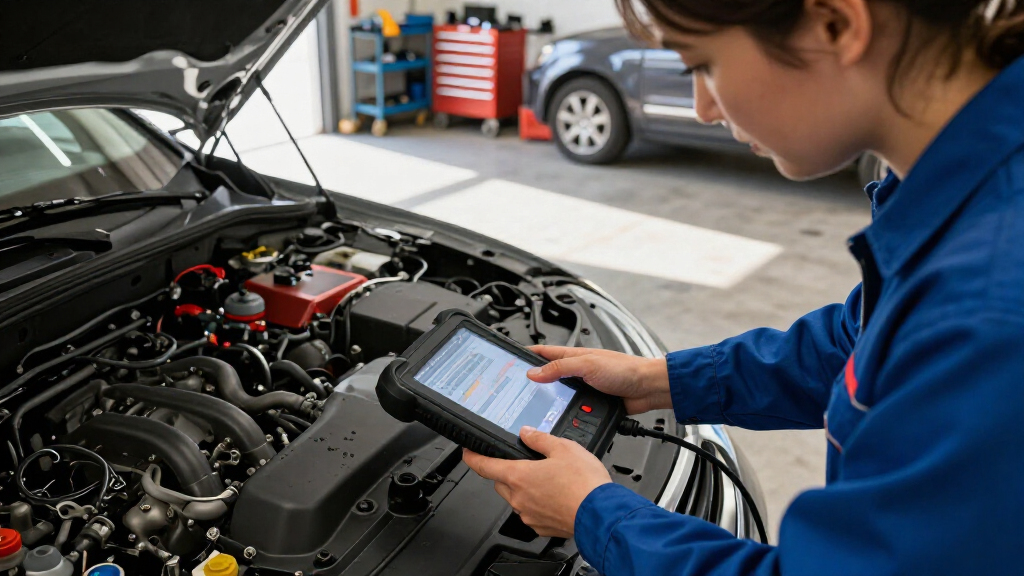
I compared these 15 automotive diagnostic scan tools by the work they can realistically support: engine-code reading, access to other vehicle systems, live data, active tests, and service functions. I also weighed interface and portability, because a capable tool is less useful if its controls make routine checks frustrating. Compatibility claims deserve special care in this category; features can differ across vehicles, so the ranking favors tools whose broader capabilities make sense for the intended buyer rather than assuming universal coverage.
The order reflects diagnostic range, usability, and practical fit, not a simple count of advertised functions. More capable bidirectional tablets rank ahead when their wider coverage can serve owners who diagnose and maintain vehicles regularly; basic readers rank lower overall but remain sensible for straightforward engine-code checks. I also considered the tradeoffs of screen size, phone dependence, and complexity, so a premium platform does not automatically outrank a simpler tool for a beginner.
Factors to Consider When Choosing Automotive Diagnostic Scan Tools
Before choosing a scanner, start with the jobs you expect it to do and the vehicle you need it to support. The biggest category mistake is buying by feature count alone: a function only helps if it works with your vehicle and fits your repair skills.
Match system coverage to the problem you need to diagnose
A basic OBD2 reader generally focuses on emissions-related engine faults, which is enough to investigate a check-engine light or confirm a code after a repair. ABS, airbag, transmission, and body-system access requires broader diagnostics, and coverage can vary by vehicle. Before paying for an all-system tool, check the supported makes, model years, and specific systems—not just the phrase “all systems.” A code reader may report a fault without showing the data or tests needed to isolate its cause. If your work usually stays under the hood, spending extra for systems you will not access may not improve your decisions. If you maintain several vehicles or need to troubleshoot warning lights beyond the engine, wider coverage can save repeated trips to a shop.
Decide whether you need bidirectional controls
Many scanners display trouble codes and sensor data, but bidirectional tools can also send commands to supported vehicle components. That can help check whether a component responds, narrowing the search before you replace parts. It does not make a scanner a repair manual or prove that a component is faulty; test conditions and vehicle-specific procedures still matter. Buyers who mostly read codes may get little value from active tests, while a hands-on DIYer or technician may use them often. Check which commands are supported for your vehicle, since “bidirectional” does not mean every actuator can be controlled on every car. Choose this feature for a defined diagnostic task, not simply because it sounds more advanced.
Check service functions against your maintenance routine
Reset functions can cover tasks such as oil-service reminders, electronic parking brakes, battery registration, or steering-angle calibration, but no scanner should be assumed to support every reset on every vehicle. Start by listing the maintenance jobs you actually perform and verify that the scanner supports those procedures for your exact vehicle. Some functions require prerequisites, special steps, or follow-up calibration, so a reset button may not replace the service procedure. Buyers often overvalue a large reset count without checking which items apply to their car. A smaller set of reliable, relevant service functions can be more useful than a long list with little overlap with your needs. For occasional maintenance, compare the tool’s coverage with the cost and convenience of having the task handled professionally.
Choose an interface that fits where and how you work
A standalone screen keeps the scanner usable without a phone, while a Bluetooth model can make a phone the display and may be easier to store. Large touchscreens can help when reviewing graphs or navigating menus, but they add bulk and may feel excessive for quick code checks. Wired readers are simple to connect and do not depend on a wireless link, though the cable can limit where you place the device. Consider whether you will use the tool in a driveway, a workshop, or on the road, and whether you need to read data while watching a component. Also check how updates are delivered and whether the interface depends on an app or account. A straightforward reader is often the better first tool if you do not yet know which advanced functions you will use.
Treat compatibility and updates as part of the purchase decision
Scanner compatibility is not a single yes-or-no claim: a tool may connect to a vehicle yet lack a particular system scan, active test, or reset for that model. Verify the vehicle identification details and the specific function you need before relying on a feature list. Ask whether updates are available, how they are installed, and whether any functions depend on an active software plan. Older vehicles and less common regional models can have different coverage from newer, widely supported vehicles. If you maintain more than one car, check each one separately rather than assuming coverage transfers across a brand’s lineup. This small research step can prevent buying a capable scanner that cannot perform the job that prompted the purchase.
Pay for capability you can use and interpret
More advanced scan tools can expose more data, but the information is only useful when you can interpret it and act safely. A beginner may benefit more from clear code descriptions and live-data basics than from a large set of functions with little guidance. Professionals and experienced DIYers may justify a broader platform if it supports frequent diagnostics across multiple vehicles. Do not treat a stored code as a complete diagnosis: codes point toward a circuit, system, or condition and often require additional checks. Consider whether you need one tool for occasional warning lights or a platform for repeated troubleshooting and maintenance. The right balance is the least complex scanner that can reliably perform the tasks you have identified.
Frequently Asked Questions
Will an OBD2 scanner work with every car?
Not every scanner supports every vehicle function, even when the vehicle has a compatible OBD2 connection. Basic emissions-related engine diagnostics are more widely supported than access to ABS, SRS, transmission, or body systems. Support can also vary by model year, region, and the specific scan or service function. Check the scanner’s compatibility information for your exact vehicle and the job you want done. If you are buying for multiple cars, verify each one separately.
Can a scan tool tell me exactly which part to replace?
A trouble code is a clue, not a definitive parts order. It may identify a system or circuit that needs investigation, while several different faults can produce similar symptoms or codes. Live data, wiring checks, and component tests may help narrow the cause, but some repairs still need a service manual or professional diagnosis. Bidirectional controls can support testing on compatible vehicles, though they do not remove the need to interpret results. Avoid replacing a part based only on a code description.
Is a Bluetooth scanner a better choice than a handheld unit?
That depends on where you prefer to view data and how you use the tool. Bluetooth models can be compact and use a phone for the display, while handheld units work independently and keep the scanner interface in one device. Phone-based tools depend on app compatibility and a wireless connection, so check those requirements before buying. A standalone unit may be more convenient when you do not want to use your phone during a repair. Neither format is inherently more capable; compare the functions and vehicle coverage that matter to you.
Do I need bidirectional controls for home repairs?
Most owners do not need bidirectional controls just to read an engine code or check whether a warning light has returned. Active tests become more useful when you are diagnosing a specific component and need to command it on a supported vehicle. They can help narrow a fault, but they do not replace safe test procedures or vehicle-specific instructions. If you perform occasional maintenance, a simpler scanner may be easier to use and better matched to your tasks. Choose bidirectional capability when you have a clear use for it, such as repeated troubleshooting or component testing.
Should I buy one scanner for several vehicles?
One scanner can serve multiple vehicles, but do not assume all of its functions will work across every make and model. Basic engine-code access may be shared more widely than manufacturer-specific systems, resets, or active tests. Make a list of the vehicles you plan to scan, then check coverage for each one and for the functions you expect to use. If the cars belong to different manufacturers, broad multi-make support may matter more than a tool tailored to one brand. For a mixed fleet, verify compatibility before purchase rather than relying on a general coverage claim.
Conclusion
For a broad balance of capability and usability, my best overall choice is the TOPDON ArtiDiag900 Lite; buyers wanting a more advanced professional-style platform should compare it with the Autel MaxiCOM MK900BT for their vehicle coverage needs. The best value for straightforward checks is the ANCEL AD310, while the FOXWELL NT301 is a sensible step up for beginners who want live data without a large tablet interface. For phone-based convenience, the BlueDriver is the lineup’s standout format; for broader diagnostic work, consider the MUCAR 632, BLCKTEC 460T, or other full-system options after checking supported functions. Choose a premium bidirectional model when you will use active tests and service functions regularly, not just for an occasional engine light. Match the scanner to your vehicles and repair habits, and verify compatibility before making the final call.