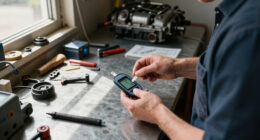

If your Milwaukee M18 charger is blinking red, it can be a sign of various issues ranging from battery health to charging station problems. Recognizing the cause quickly can save you time and prevent further damage to your tools and batteries.
In this guide, we’ll walk you through practical, safe steps to identify and fix the blinking red light issue, ensuring your Milwaukee tools work efficiently when you need them most.
Key Takeaways
| Understanding the blinking red light | A blinking red light indicates charging issues, battery problems, or charger faults. |
| Check battery compatibility and health | Ensure batteries are compatible, properly seated, and in good condition. |
| Inspect the charger and connections | Look for dirt, damage, or loose connections that may interfere with charging. |
| Follow safe troubleshooting steps | Always disconnect power before inspecting or handling batteries and chargers. |
| Know when to replace or repair | Persistent blinking indicates a need for battery replacement or professional repair. |
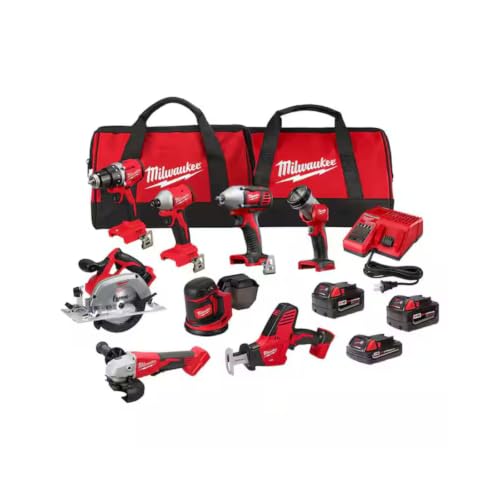
Milwaukee M18 18V Cordless Power Tool Combo Kit, 8-Tool Set, 3 Batteries, 2 Tool Bags, Charger Included
- Complete 8-Tool Set: Hammer drill, impact driver, saw, grinder, reciprocating saw, multi-tool, work light
- Includes 3 Batteries: Two high-capacity and one compact battery
- M18 Lithium-Ion System: Consistent power and extended runtime
As an affiliate, we earn on qualifying purchases.
Identify the Source of the Red Blinking
The first step is to determine whether the blinking red light is coming from the charger, the battery, or both. Most Milwaukee chargers feature indicator lights that change color to signal different statuses. A blinking red typically signals an issue that needs attention.
Start by unplugging the charger and removing the battery. Examine the battery for any visible damage, swelling, dirt, or corrosion. Next, check the charger for signs of damage or debris on the contacts. Identifying whether the issue is with the battery or the charger helps narrow down the fix.
Check Battery Compatibility and Condition
- Ensure that the battery is compatible with your Milwaukee M18 charger. Using non-compatible batteries can cause charging faults.
- Inspect the battery’s contacts for dirt, dust, or corrosion. Clean gently with a dry cloth or a soft brush if needed.
- Test the battery with a different charger if available. If it charges normally elsewhere, the issue may be with your charger.
- If the battery is old or shows signs of swelling or damage, it’s best to replace it. Use Milwaukee-approved batteries like the 48-11-1850R or the newer REDLITHIUM models for best results.
Inspect and Clean Charger Contacts and Port
Dirty or damaged contacts can interfere with proper charging. Carefully unplug the charger and inspect the metal contacts on both the charger and the battery. Use a dry cloth or a soft brush to remove any debris or corrosion.
If the contacts are visibly damaged or bent, professional repair or replacement may be necessary. Also, check the power cord and plug for damage. Ensure the charger is plugged into a functioning outlet, ideally one with a stable power supply.
Perform a Reset and Test Charging
- Unplug the charger from the power source and remove the battery.
- Wait for about 30 seconds to allow internal circuits to reset.
- Reconnect the charger to a known working outlet, then insert a fully compatible, healthy battery.
- Observe the indicator light. If it turns solid green or flashes green, the issue is resolved. If it continues blinking red, proceed to the next step.
Always follow manufacturer instructions for resetting your specific charger model. If your charger has a reset button, use it as directed.
Identify When to Replace or Seek Professional Repair
If after all troubleshooting steps the charger still blinks red, it may indicate a faulty internal component or a dead battery. In such cases, try replacing the battery first with a new or known-good unit like the Milwaukee 48-11-1850R 5.0 Ah XC Extended Capacity Resistant Battery or the REDLITHIUM HIGH Output XC 6.0Ah Battery Pack.
If the problem persists, contact Milwaukee customer service or visit an authorized service center for professional diagnosis and repair. Continuing to use a faulty charger can risk further damage or safety hazards.
The Products in This Guide

Milwaukee M18 18V Cordless Power Tool Combo Kit
- ✔ Weight: Varies by tool
- ✔ Battery capacity: Up to 6.0Ah
- ✔ Warranty: Milwaukee’s standard warranty

Milwaukee Shockwave 100pcs Impact Driver Bit Set Packout
- ✔ Weight: Varies by case
- ✔ Material: Impact steel
- ✔ Warranty: Limited lifetime
Milwaukee M18 18V Cordless Power Tool Combo Kit
<p>The Milwaukee M18 18V Cordless Power Tool Combo Kit offers a comprehensive set of tools, batteries, and a charger designed to handle a wide variety of construction, remodeling, and maintenance tasks. Its included rapid charger and high-capacity batteries ensure minimal downtime, making it a versatile choice for professionals and DIYers alike.</p> <p>While the charger provides dependable performance, issues like blinking red lights can occasionally occur. This guide helps troubleshoot these issues effectively to keep your tools running smoothly.</p>
Pros:
- Complete 8-tool set for versatile applications
- Includes 3 batteries for extended runtime
- Rapid charger reduces downtime
- Durable carrying cases for organization
Cons:
- Charger blinking red can cause concern
- Requires proper maintenance to prevent faults
- Battery compatibility is essential to avoid issues
Best for: Construction, remodeling, and heavy-duty maintenance tasks requiring reliable cordless power.
Not ideal for: Casual users or those with minimal tool needs may find the full kit excessive.
Bottom line: A comprehensive cordless power tool kit with reliable batteries and charger, perfect for demanding jobs.
Milwaukee Shockwave 100pcs Impact Driver Bit Set Packout
<p>This 100-piece impact driver bit set in Packout cases gives you a wide variety of bits suitable for most fastening tasks. Compatible with Milwaukee M18 impact drivers, it complements your power tools perfectly, enhancing productivity and reducing downtime.</p> <p>Ideal for professionals and DIY enthusiasts who want a reliable, organized bit collection.</p>
Pros:
- Extensive variety of bits
- Packout case for organization
- Durable impact-ready bits
- Compatible with all M18 impact drivers
Cons:
- Heavy set for casual users
- Bits may wear over time if misused
- Storage case can be bulky
Best for: Heavy-duty fastening, remodeling, and construction projects.
Not ideal for: Light-duty or occasional users might find it more than needed.
Bottom line: A comprehensive, organized impact driver bit set for professional-grade fastening.
Frequently Asked Questions
What causes the Milwaukee charger to blink red?
A blinking red light generally indicates a charging issue, which can be caused by incompatible or damaged batteries, dirty contacts, or internal charger faults.
Can I fix a blinking red light myself?
Yes, many issues can be resolved by cleaning contacts, checking compatibility, resetting the charger, or replacing batteries. However, persistent problems may require professional repair.
How do I know if my battery is bad?
Signs of a bad battery include swelling, corrosion, inability to hold charge, or if it causes the charger to blink red repeatedly. Testing with a known-good charger can help diagnose this.
Is it safe to continue using a charger that blinks red?
No, continued use can risk further damage or safety hazards. It’s best to troubleshoot and repair or replace the faulty component before further use.
What Milwaukee batteries are recommended for troubleshooting?
Use Milwaukee’s high-capacity batteries like the 48-11-1850R 5.0 Ah XC or the REDLITHIUM HIGH Output XC 6.0Ah for compatibility and reliable performance.
Keeping Your Milwaukee Power Tools Charging Smoothly
Addressing a blinking red light on your Milwaukee charger involves simple, methodical steps that can often resolve the issue without professional help. Regular maintenance, using compatible batteries, and inspecting contacts can extend the lifespan of your charger and batteries. Remember to always prioritize safety—disconnect power before inspecting or cleaning your equipment. With proper troubleshooting, you can keep your tools ready for any demanding task, ensuring maximum productivity on your projects.
Affiliate disclosure: As an Amazon Associate we earn from qualifying purchases. Prices and availability are accurate as of the time of publishing.